


Overview
The URL Scraper Model in PromptForm allows you to scrape content from websites for use in various prompts and workflows. This documentation provides a guide on setting up the scraper, including useful configurations and techniques to handle common challenges.
Basic Usage
Input Field Configuration
When configuring the scraper, start by adding an input field for the URL. In PromptForm, you can't reference this field using the @ symbol due to its field type limitations. Instead, reference it using the input field number, such as #input1. Even if you name the field (e.g., "Landing Page URL"), you still need to refer to it as #input1.
URL Scraper Setup
Once you have the input field, add a prompt to scrape the page content. Simply reference the URL by input field number (#input1), and the scraper will begin extracting content from the provided URL.
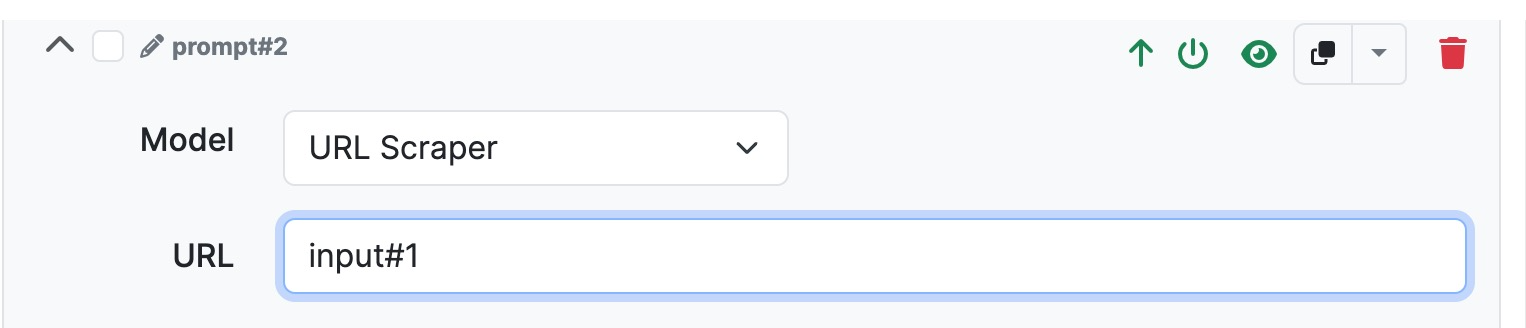
Paths and Parameters
For most typical use cases, you can leave paths and parameters empty. These are primarily useful if more advanced scraping logic is needed.
Advanced Configuration Tips
Chrome Headless vs. Default
The URL scraper has the option to use Chrome headless mode, which often yields better results when scraping pages with JavaScript-heavy content. If scraping with the default method fails, try enabling Chrome headless mode.
User-Agent Header
For some sites, you may need to modify the
Example User-Agent:
Mozilla/5.0 (Windows NT 10.0; Win64; x64) AppleWebKit/537.36 (KHTML, like Gecko) Chrome/123.0.0.0 Safari/537.36
You can find User-Agent examples by searching "user agents for scraping" online. Copy and paste a User-Agent string to make the scraper appear like a normal browser.
Scraping Modes: Text-Only vs. Full Content
You can configure the scraper to extract full HTML content or text-only content.
Full Content: Extracts the entire HTML, including scripts and tags.
Text Only: Extracts visible text, ignoring HTML tags.
CSS Selector for Targeting Content
You can use the body CSS selector to specifically target text inside the <body> tag. This is useful if you only want the main textual content and not other elements like scripts or metadata.
Alternative Scraping Solutions
Jina.ai offers a free service, called Reader, that converts webpage content into a more readable format (similar to markdown).
To use it, simply prepend https://r.jina.ai/https:// to your target URL.
Example: If your input URL is example.com, set the scrape URL to https://r.jina.ai/https://example.com. This can help provide cleaner, easier-to-use content.
Jina.ai Search Endpoint
https://s.jina.ai/When%20was%20Jina%20AI%20founded%3F. You can use parameters to refine your searches and get specific sections of content, such as search results or queries.
FireCrawl Integration
Overview: FireCrawl allows users to either scrape a single URL or perform a comprehensive crawl of multiple pages. This tool provides several options such as setting maximum crawl depth, including or excluding specific paths, and extracting targeted content.
Scraping Options:
Single Scrape: Use FireCrawl to extract content from a single URL, similar to the built-in scraper.
Full Crawl: Set parameters like maximum depth to crawl through multiple linked pages from a starting URL. This can be useful for gathering data across an entire website.
Advanced Features:
Authorization Tokens: You may need to include authorization tokens for certain sites, particularly those with restricted access.
Custom Paths: Define specific paths to include or exclude during a crawl, offering greater control over what parts of a site are targeted.
Use Cases:
Fallback Scraper: FireCrawl is ideal as a fallback if the built-in scraper or Jina.ai solutions are not working for a specific use case.
Troubleshooting Tips
Switching Methods
If scraping is failing, try switching between Chrome headless mode and the default scraper.
Using different User-Agent headers can also help bypass scraping restrictions on some sites.
Fallback Options
If all else fails, try switching to Jina.ai Reader or FireCrawl to get the content you need. Each tool offers unique capabilities that may be better suited for specific websites.