


Overview
The Knowledge Center is a new centralized page in PromptForm where you can manage all of your key resources in one place. It combines the functionality of the old Documents page and several settings that were previously found in your account profile, giving you a streamlined space to organize and control your workflow.
With the Knowledge Center, you can now access and manage:
Memories & Memory Vault
Personal Custom Fields
Tool Integrations (by permission)
Documents (by permission)
This update replaces the old Documents page in the sidebar, and any links pointing to the old page will automatically redirect here.
Accessing the Knowledge Center
You can find the Knowledge Center as a menu item in the navigation sidebar.
If you had bookmarks or saved links to the old Documents page, they will now redirect you to the Knowledge Center.
What’s Inside the Knowledge Center
1. Memories
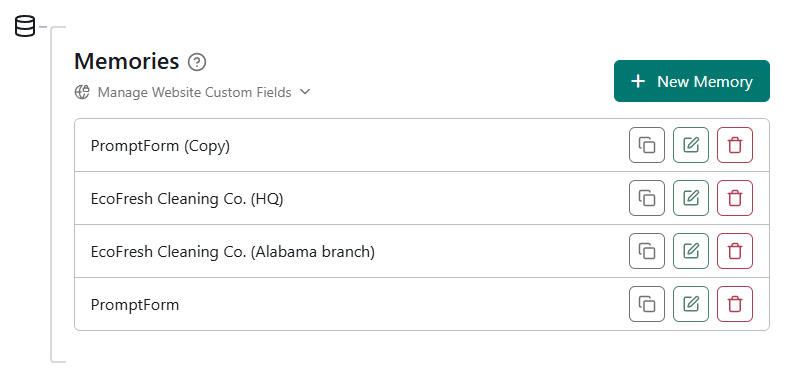
The Memories section is where you can create and manage saved memories.
Each memory is made up of two kinds of fields:
Website Custom Fields (created and set from the website’s properties/settings)
Personal Custom Fields (created and managed directly in the Knowledge Center)
You can add values into these fields and save them under a chosen name. That saved entry becomes a memory.
Memories let you quickly store and reuse structured context, making it easier to work consistently across your apps.
2. Personal Custom Fields
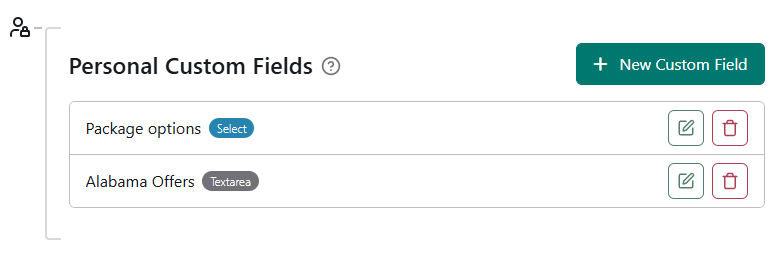
The Personal Custom Fields section allows you to create and manage fields unique to your account.
Think of them as similar to Website Custom Fields, but private and tied only to your user account.
Any Personal Custom Fields you create can be used when building Memories.
The values stored here are only visible to you, ensuring they stay personal and not shared across the workspace.
3. Tool Integrations (permission required)
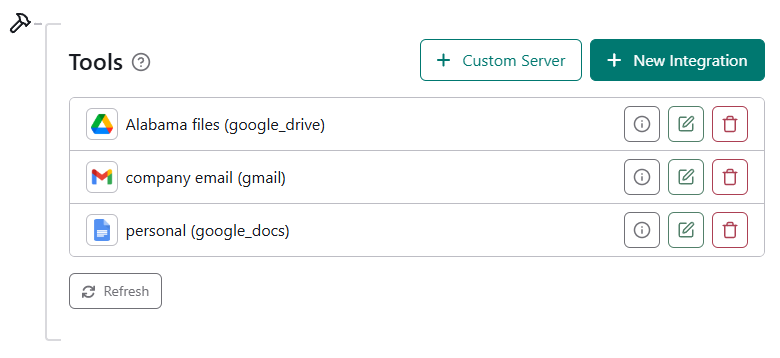
This section lets you connect and manage external tools for use in PromptForm apps.
If you don’t see this section, it means you don’t have permission to use tool integrations.
Contact your administrator if you believe you should have access.
4. Documents (permission required)
The Documents section has been redesigned and moved into the Knowledge Center.
This section is only available if you have permission to manage apps.
If it isn’t visible, reach out to your site administrator.
Permissions and Visibility
Tools and Documents are only displayed if you have the correct permissions.
If a section you expect is missing, check with your site administrator.
FAQs
Q: What happened to the old Documents page?
A: It’s been fully replaced by the new Knowledge Center. All links to the old page now redirect here.
Q: Why don’t I see the Tools or Documents sections?
A: These sections require specific permissions. Contact your site administrator if you need access.
Q: Where do I find my Memories and Custom Fields now?
A: These have been moved from your account profile and can now be found inside the Knowledge Center.